

Deploying a baseline time series forecasting agent with Strands Agents and Amazon Bedrock AgentCore
1. Overview
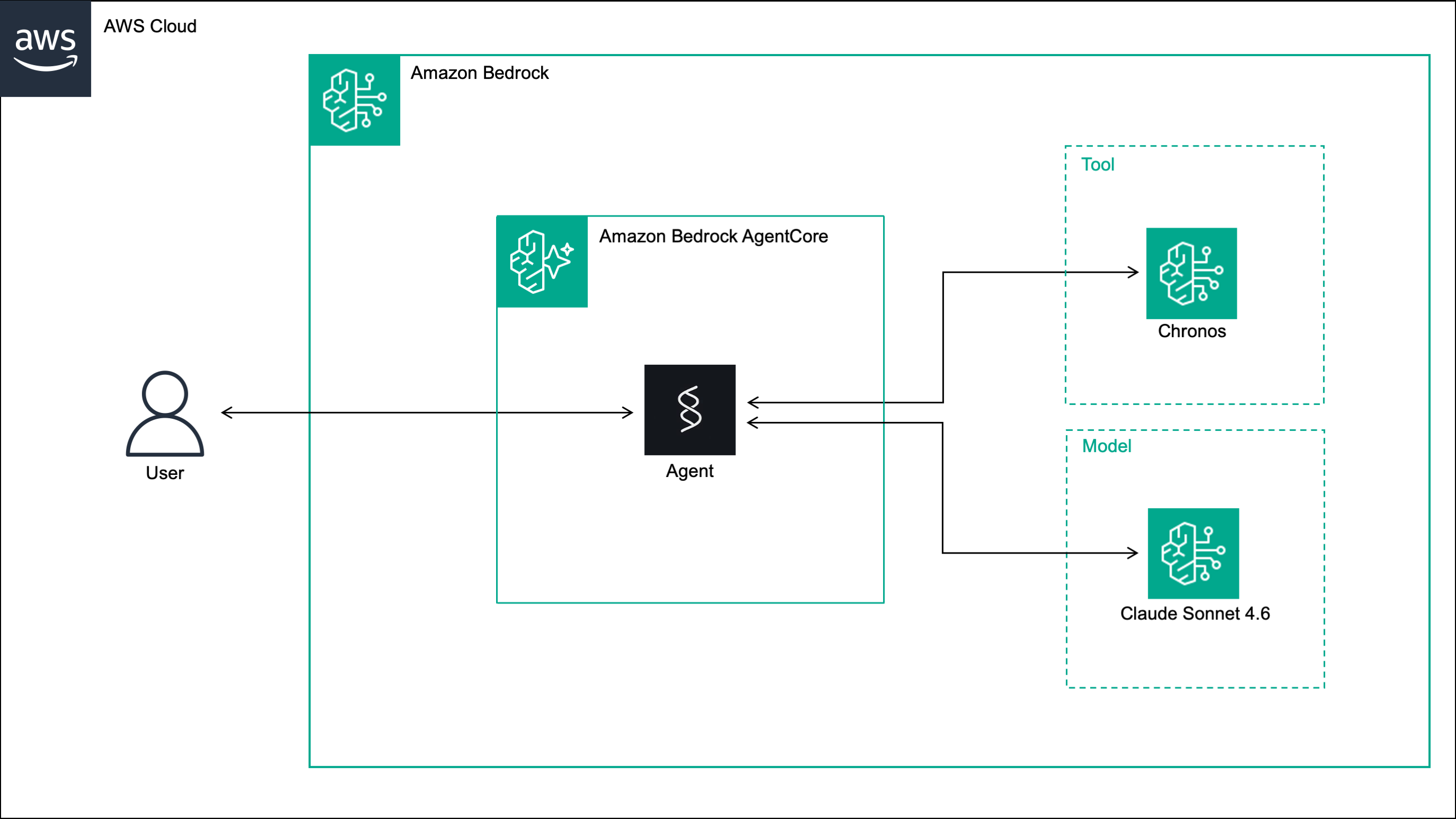
In this post, we build a conversational time series forecasting agent. The agent exposes a time series forecasting model as a tool, and supports multi-turn conversations with short-term memory, allowing users to generate forecasts and iteratively adjust parameters such as context windows, prediction horizons and quantile levels.
The forecasting tool uses Chronos [1], a family of foundation models for zero-shot probabilistic forecasting of univariate time series trained on a large collection of real and synthetic time series datasets using the T5 architecture [2]. Specifically, the tool uses Chronos-Bolt [3], a faster, more accurate and more memory-efficient variant that runs on CPU and is available on Amazon Bedrock Marketplace.
The agent is built with Strands Agents, where orchestration decisions are delegated to the language model rather than defined in fixed, predefined workflows. The agent is deployed to Amazon Bedrock AgentCore, a serverless environment designed for AI agents that provides session isolation, short-term memory and built-in observability through Amazon CloudWatch.
Note
In this implementation, the user provides the time series values directly in the chat message. For a more production-ready solution, see our earlier post, where the assistant retrieves time series data from a database via the Model Context Protocol (MCP) and the user communicates with the assistant through the LibreChat interface.
2. Solution
The solution consists of three steps: deploying Chronos-Bolt to Bedrock, building the Strands agent and deploying it to Bedrock AgentCore.
2.1 Deploy Chronos to Amazon Bedrock
We start by deploying Chronos-Bolt to a Bedrock endpoint hosted on a CPU EC2 instance using Boto3. To use the code below, you need to provide the Bedrock Marketplace ARN of Chronos-Bolt in your AWS region, the ARN of your Bedrock execution role, and a custom endpoint name.
import boto3

# Create the Bedrock client
bedrock_client = boto3.client("bedrock")

# Create the Bedrock endpoint
response = bedrock_client.create_marketplace_model_endpoint(
    modelSourceIdentifier="<bedrock-marketplace-arn>",
    endpointConfig={
        "sageMaker": {
            "initialInstanceCount": 1,
            "instanceType": "ml.m5.4xlarge",
            "executionRole": "<bedrock-execution-role>"
        }
    },
    endpointName="<bedrock-endpoint-name>",
    acceptEula=True,
)

# Get the Bedrock endpoint ARN
bedrock_endpoint_arn = response["marketplaceModelEndpoint"]["endpointArn"]
The bedrock_endpoint_arn returned by the code will be needed in two places: inside the agent’s tool when
invoking the endpoint, and in a custom IAM policy that grants the AgentCore execution role permission to invoke the endpoint.
Important
Remember to delete the endpoint when it is no longer needed to avoid unexpected charges:
# Delete the Bedrock endpoint
response = bedrock_client.delete_marketplace_model_endpoint(
    endpointArn=bedrock_endpoint_arn
)
2.2 Build the agent with Strands Agents
To build the agent, we need three files: an empty __init__.py, agent.py, and requirements.txt.
agent/
├── __init__.py
├── agent.py
└── requirements.txt
The agent.py script is shown below. It implements a Strands agent backed by Claude Sonnet 4.6 on Bedrock which responds
to forecasting requests using a generate_forecasts tool. The tool takes as input the historical time series
values, the prediction length and the quantile levels, and invokes the Chronos-Bolt endpoint on Bedrock
to return the predicted mean and quantiles. The agent is wrapped in a BedrockAgentCoreApp with an async
streaming entrypoint that yields agent events - including not only text responses, but also tool call inputs
and results - back to the caller.
import json
import boto3
from strands import Agent, tool
from bedrock_agentcore.runtime import BedrockAgentCoreApp

# ── Tools ──────────────────────────────────────────────────────────────────

# Create the Bedrock runtime client
bedrock_runtime_client = boto3.client(
    service_name="bedrock-runtime",
    region_name="<bedrock-runtime-region>"
)


# Define the time series forecasting tool
@tool
def generate_forecasts(
    target: list[float],
    prediction_length: int,
    quantile_levels: list[float]
) -> dict:
    """
    Generate probabilistic time series forecasts using Chronos on Amazon Bedrock.

    Parameters:
    ===============================================================================
    target: list of float.
        The historical time series values used as context.

    prediction_length: int.
        The number of future time steps to predict.

    quantile_levels: list of float.
        The quantiles to be predicted at each future time step.

    Returns:
    ===============================================================================
    dict
        Dictionary with predicted mean and quantiles at each future time step.
    """
    # Invoke the Chronos endpoint on Amazon Bedrock
    response = bedrock_runtime_client.invoke_model(
        modelId="<bedrock-endpoint-arn>",
        body=json.dumps({
            "inputs": [{
                "target": target
            }],
            "parameters": {
                "prediction_length": prediction_length,
                "quantile_levels": quantile_levels
            }
        })
    )

    # Extract and return the forecasts
    forecasts = json.loads(response["body"].read()).get("predictions")[0]
    return forecasts


# ── Agent ──────────────────────────────────────────────────────────────────

# Create the agent
agent = Agent(
    model="eu.anthropic.claude-sonnet-4-6",
    tools=[generate_forecasts],
    system_prompt=(
        "You are a time series forecasting assistant. "
        "When given a list of numerical values, use the `generate_forecasts` tool to produce a forecast. "
        "Always ask the user for `prediction_length` and `quantile_levels` if not provided, do not assume or default any values. "
    ),
)

# ── App ──────────────────────────────────────────────────────────────────

# Create the AgentCore app
app = BedrockAgentCoreApp()


# Define the entrypoint of the AgentCore app
@app.entrypoint
async def invoke(payload: dict):
    """
    Stream agent events in response to a user message.

    Parameters:
    ===============================================================================
    payload: dict
        Request payload containing the user message under the "prompt" key.

    Yields:
    ===============================================================================
    dict
        Agent event dictionaries containing text chunks, tool use information,
        and lifecycle events emitted during agent execution.
    """
    stream = agent.stream_async(payload.get("prompt", ""))
    async for event in stream:
        yield event


# Run the AgentCore app
if __name__ == "__main__":
    app.run()
The requirements.txt lists the packages needed to run the agent:
boto3==1.42.73
bedrock_agentcore==1.4.7
strands-agents>=1.0.0
2.3 Deploy the agent to Amazon Bedrock AgentCore
We deploy the agent with the bedrock-agentcore-starter-toolkit using direct code deployment.
The --non-interactive flag skips the interactive prompts and deploys with short-term memory enabled by default.
Short-term memory persists conversation context within a session without requiring any configuration in the agent code.
agentcore configure \
    --entrypoint agent.py \
    --name forecasting_agent \
    --deployment-type direct_code_deploy \
    --runtime PYTHON_3_12 \
    --requirements-file requirements.txt \
    --non-interactive

agentcore launch
The deployment creates four resources: an AgentCore Runtime named forecasting_agent,
a short-term memory resource in AgentCore Memory linked to the runtime, a deployment package uploaded as
a zip file to S3, and an AgentCore Runtime execution role in IAM.
Important
Attach the following policy to the AgentCore execution role in IAM to allow the agent to invoke the
Chronos-Bolt endpoint on Bedrock. Replace <bedrock-endpoint-arn> with the
bedrock_endpoint_arn returned in Section 2.1.
{
    "Version": "2012-10-17",
    "Statement": [
        {
            "Effect": "Allow",
            "Action": [
                "sagemaker:InvokeEndpoint"
            ],
            "Resource": [
                "<bedrock-endpoint-arn>"
            ],
            "Condition": {
                "StringEquals": {
                    "aws:CalledViaLast": "bedrock.amazonaws.com",
                    "aws:ResourceTag/sagemaker-sdk:bedrock": "compatible"
                }
            }
        }
    ]
}
2.4 Test the agent in a Jupyter Notebook
We start by importing the required libraries: boto3 to invoke the agent on Bedrock AgentCore,
json to serialize the request payload and deserialize the response, uuid to generate unique session
identifiers, and IPython.display to render the agent’s responses as formatted Markdown in the notebook.
# Import the required libraries
import json
import boto3
import uuid
from IPython.display import Markdown, display
Next, we set up the client and helper functions. We define the AgentCore
Runtime ARN and region, create a Boto3 client for invoking the
agent, and implement three helper functions:
parse_streaming_response to extract agent messages from the response
stream, get_streaming_response to invoke the agent and return the
parsed messages, and print_messages to render a conversation turn in
the notebook with formatted text, tool calls and tool results.
# Configure the Bedrock AgentCore runtime
AGENTCORE_RUNTIME_ARN = "<agentcore-runtime-arn>"
REGION = "<agentcore-runtime-region>"

# Create the Bedrock AgentCore client
agentcore_client = boto3.client(
    service_name="bedrock-agentcore",
    region_name=REGION
)

def parse_streaming_response(response: dict) -> list[dict]:
    """
    Parse the streaming response from AgentCore and extract agent messages.

    Parameters:
    ===============================================================================
    response: dict
        The raw response dictionary returned by invoke_agent_runtime,
        containing a StreamingBody object under the "response" key.

    Returns:
    ===============================================================================
    list[dict]
        List of agent message dictionaries extracted from the event stream.
    """
    messages = []
    for line in response["response"].iter_lines():
        if line:
            data = line.decode("utf-8")
            try:
                start, end = data.index("{"), data.rindex("}")
                event = json.loads(data[start:end + 1], strict=False)
                if "message" in event:
                    messages.append(event["message"])
            except (ValueError, json.JSONDecodeError):
                pass
    return messages


def get_streaming_response(prompt: str, session_id: str) -> list[dict]:
    """
    Invoke the forecasting agent on Amazon Bedrock AgentCore and return
    the agent messages.

    Parameters:
    ===============================================================================
    prompt: str
        The user message to send to the agent.

    session_id: str
        The session identifier used to maintain conversation context across turns.

    Returns:
    ===============================================================================
    list[dict]
        List of agent message dictionaries.
    """
    # Invoke the agent on Bedrock AgentCore
    response = agentcore_client.invoke_agent_runtime(
        agentRuntimeArn=AGENTCORE_RUNTIME_ARN,
        runtimeSessionId=session_id,
        payload=json.dumps({"prompt": prompt}),
    )

    # Parse and return the streaming response
    messages = parse_streaming_response(response)
    return messages


def print_messages(prompt: str, messages: list[dict]) -> None:
    """
    Display a conversation turn in a Jupyter notebook, including the user
    prompt, agent text responses, tool calls and tool results.

    Parameters:
    ===============================================================================
    prompt: str
        The user message sent to the agent.

    messages: list[dict]
        List of agent message dictionaries returned by the agent.
    """
    # Display the user prompt
    display(Markdown(f"<h2>User:</h2><br>{prompt}"))

    # Display the agent response
    display(Markdown("<h2>Agent:</h2><br>"))
    for message in messages:
        for content in message["content"]:
            if "text" in content:
                # Display text response as formatted markdown
                display(Markdown(content["text"]))
            elif "toolUse" in content:
                # Display tool call name and inputs
                display(Markdown(f"🔨 Ran `{content['toolUse']['name']}`"))
                print({"input": content["toolUse"]["input"]})
            elif "toolResult" in content:
                # Display tool result output
                if "content" in content["toolResult"]:
                    tool_output = content["toolResult"]["content"][0]["text"]
                    display(Markdown("🔨 Output:"))
                    print({"output": json.loads(tool_output)})
We generate a unique session ID to identify this conversation. The same session ID will be reused across all turns to maintain conversation context and short-term memory.
# Generate the session ID
session_id = str(uuid.uuid4())
We start the conversation by asking the agent what it can do.
# Turn 1 / 3
prompt = """
What can you help me with?
"""
messages = get_streaming_response(prompt, session_id)
print_messages(prompt, messages)
We then provide a time series and ask the agent to forecast the next 10 values. The agent asks for the quantile levels before proceeding, as instructed by the system prompt.
# Turn 2 / 3
prompt = """
Can we predict the next 10 values of this time series?
[16, 6, 0, 3, 13, 20, 18, 9, 1, 1, 10, 18, 19, 12, 3, 0, 7, 16, 20, 15, 5, 0, 4, 14, 20, 17, 8, 1, 2, 11, 19, 19, 11, 2, 1, 8, 17, 20, 14, 4, 0, 5, 14, 20, 16, 7, 0, 3, 12, 19, 18, 10, 2, 1, 9, 18, 20, 13, 3, 0, 6, 15, 20, 16]
"""
messages = get_streaming_response(prompt, session_id)
print_messages(prompt, messages)
We provide the requested quantile levels and specify that we want the mean instead of
the median. The agent now has all the information it needs and calls the generate_forecasts tool, returning the mean
forecast and the 95% prediction interval. This turn demonstrates the short-term memory capability - the agent recalls
the time series and prediction length from the previous turn without us repeating them.
# Turn 3 / 3
prompt = """
I need a 95% prediction interval. I don't need the median, only the mean.
"""
messages = get_streaming_response(prompt, session_id)
print_messages(prompt, messages)
You can download the full code from our GitHub repository.
References
[1] Ansari, A.F., Stella, L., Turkmen, C., Zhang, X., Mercado, P., Shen, H., Shchur, O., Rangapuram, S.S., Arango, S.P., Kapoor, S. and Zschiegner, J., (2024). Chronos: Learning the language of time series. arXiv preprint, doi: 10.48550/arXiv.2403.07815.
[2] Raffel, C., Shazeer, N., Roberts, A., Lee, K., Narang, S., Matena, M., Zhou, Y., Li, W. and Liu, P.J., (2020). Exploring the limits of transfer learning with a unified text-to-text transformer. Journal of machine learning research, 21(140), pp.1-67, doi: 10.48550/arXiv.1910.10683.
[3] Ansari, A.F., Turkmen, C., Shchur, O., and Stella, L. (2024). Fast and accurate zero-shot forecasting with Chronos-Bolt and AutoGluon. AWS Blogs - Artificial Intelligence.